참고
https://nextjs.org/docs/pages/api-reference/config/next-config-js/output
https://oliveyoung.tech/2024-06-16/next-cdn-standalone
output: ‘standalone’이란?
Docker에 배포를 하기 위해서 next.config.ts에 output: ‘standalone’이라는 설정을 주었다. 이 설정은, next.js 앱을 docker 컨테이너나 node.js 환경에 배포하기 쉽게 최소한의 파일(.next/standalone, 즉, 모든 의존성이 포함된 디렉토리)과 node_modules를 자동 수집해서 실행 가능하도록 만들어주는 옵션이다.
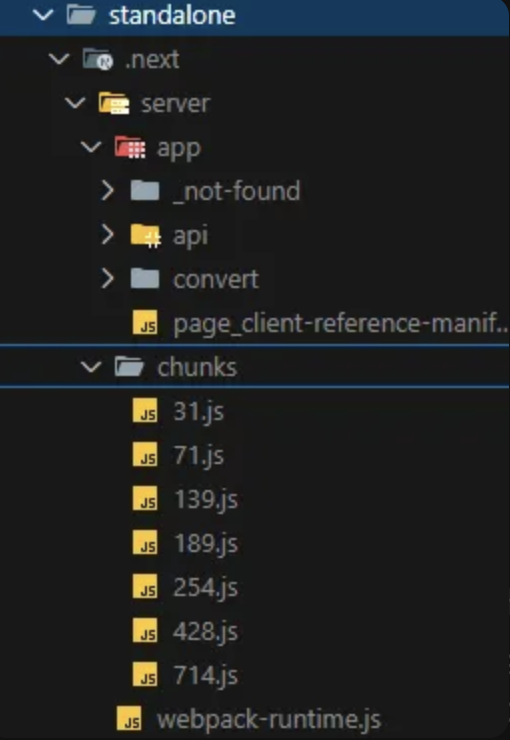
pnpm build를 하면, 위와 같은 standalone 폴더가 .next 안에 생기는 것 같다.
.next/standalone/server 폴더는 ssr 코드만 포함된다. 그 안의 .next/standalone/server/app 폴더는 app router 디렉토리에 대한 서버 렌더링 코드이다. .next/static은 csr을 위한 js 번들, css, 이미지 등 클라이언트에서 사용될 정적 자산이다. 즉, 브라우저에서 실행되는 클라이언트 코드인 것이다.
| 항목 | 일반 next build | output: "standalone" |
| 목적 | 개발/로컬 실행에 최적화 | Docker/서버 배포에 최적화 |
| 폴더 구성 | .next 내 다양한 내부 구조 | .next/standalone + .next/static |
| node_modules 포함 여부 | 전체 포함 | SSR에 필요한 부분만 포함 |
| 용량 | 큼 | 작음 (배포에 적합) |
| 배포 방식 | 전체 프로젝트를 배포 | .next/standalone, .next/static 만 배포 가능 |
근데 왜 standalone을 제외한 .next 안에는 배포 시, 쓸모 없어 보이는 파일이 많을까?
.next 폴더는 여전히 로컬 실행 및 디버깅용 캐시, 파일들을 포함하기 때문이다. 그래서 standalone은 배포 파일만 따로 모아주는 것이다.
배포 방법
1. next.config.ts 수정
import type { NextConfig } from 'next';

const nextConfig: NextConfig = {
    output: 'standalone',
    experimental: {
        serverActions: {
            bodySizeLimit: '2mb',
        },
    },
    eslint: {
        ignoreDuringBuilds: true, // eslint 에러 무시
      },
};

export default nextConfig;
2. 코드 업로드
3. .env 파일 생성
4. Dockerfile 생성
// Dockerfile
# 1단계: 빌드
FROM node:18-alpine AS builder

WORKDIR /app

COPY package.json pnpm-lock.yaml ./
RUN npm install -g pnpm && pnpm install

COPY . .

RUN pnpm build

# 2단계: 실행
FROM node:18-alpine AS runner

WORKDIR /app

# standalone 구조에 맞게 복사
COPY --from=builder /app/.next/standalone ./
COPY --from=builder /app/.next/static ./.next/static
COPY --from=builder /app/public ./public

ENV NODE_ENV=production
EXPOSE 3000

CMD ["node", "server.js"]
5. docker-compose.prod.yml 생성
version: '3.8'

services:
  nextjs-app:
    build:
      context: .
      dockerfile: Dockerfile
      args:
        NODE_ENV: production
    ports:
      - "3000:3000"
    env_file:
      - .env
      - .env.production
    restart: always
6. .dockerignore 생성
node_modules
.next
.git
.gitignore
Dockerfile
docker-compose.yml
docker-compose.prod.yml
README.md
7. 도커 실행
docker-compose -f docker-compose.prod.yml up --build -d
배포 결과
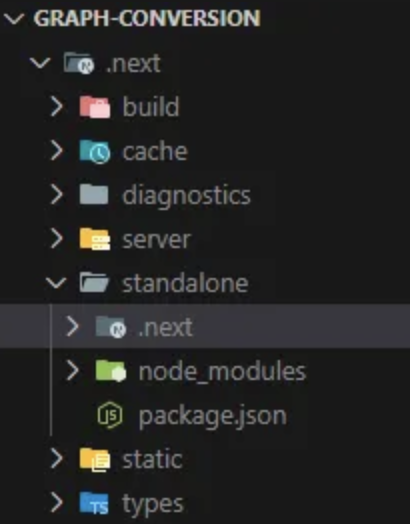
standalone 폴더가 경량화 된 폴더이고, 이 폴더만을 사용하여 next.js 서버를 운영할 수 있다고 한다.
'Dev' 카테고리의 다른 글
| Git Flow 전략을 선택한 이유와 main 브랜치의 역할 (0) | 2025.10.13 |
|---|---|
| Semantic Versioning (0) | 2025.02.25 |